 Baby Suite
Feeds, sleep, diapers, medicines and growth, logged with one thumb while the other arm holds the baby. Before the birth, Mama Mode keeps mum's pregnancy diary. One family account, both parents in sync. No ads, ever.
Looking for baby names? 💘 Play Baby Match: swipe together until one name wins. Free, in your browser.
A feed, a nappy or a nap is logged in a tap or two. The home screen shows "right now" at a glance: when the last bottle was, how long she's been asleep, what's likely next. No forms, no fiddling, no waiting for a sync wheel.


Nest was designed dark-first: a dim palette, big touch targets and quiet type, so logging the 3am feed doesn't wake you up the rest of the way - or the baby. Day mode is there too; the app follows the clock unless you pin one.
"Bottle 120." Spoken, confirmed, logged: hands stay free and the lights stay off. Voice logging understands feeds, diapers, sleep and notes, and always shows you what it heard before anything is saved.
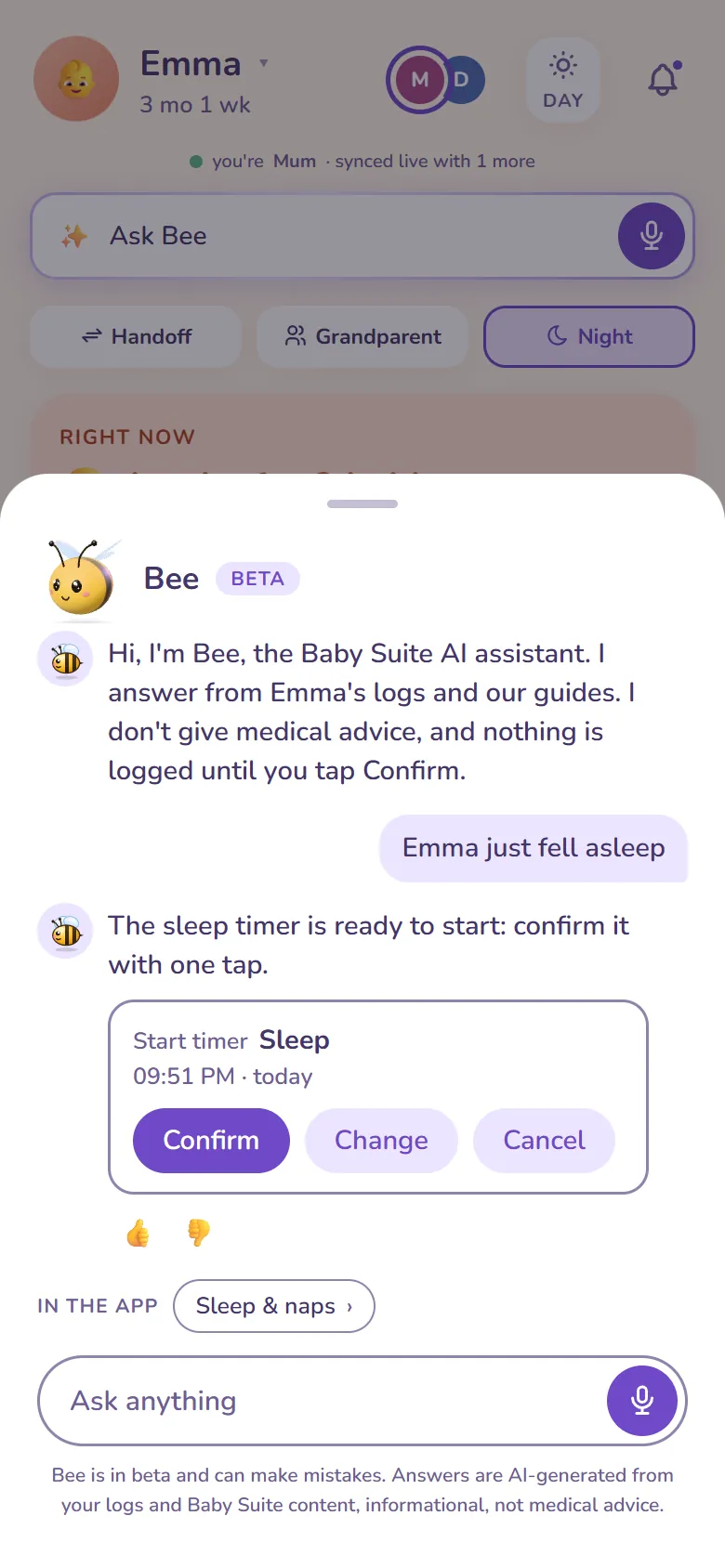
Bee is Baby Nest's AI assistant, part of Premium. Ask in plain words, typed or out loud, like "when did she last eat?" or "how did last night go?", and Bee looks it up in your own logs and answers in a sentence or two. Say "she's asleep" or "stop the feed" and Bee gets the entry ready as a card; nothing is saved until you confirm. Bee is not a doctor: for health questions it shares Baby Suite's guides and tells you who to call. Its answers are AI-generated and labelled, and Bee is still in beta.
One family account. You and your partner log from your own phones into the same timeline, live: no shared password, no "did you feed her?" texts. Premium adds grandparents and sitters with their own access, a shift-handoff briefing, and a simplified grandparent mode.
Weigh-ins and measurements land on WHO reference curves, told reassuringly - where your baby's numbers sit within the reference band, and what to bring up at the next checkup. Medicine logging keeps doses and the next-dose window you set in one place.
Before an appointment, pick a period in Settings and Baby Nest turns what you logged into a clear A4 report: feeds, sleep and diapers per day, growth on WHO curves, medicines, temperatures, first foods, milestones and notes, with space for your questions. During pregnancy it summarises your Mama Mode diary instead. Print it or save it as a PDF; it's made on your phone and sent nowhere. Part of Premium, and like the rest of Nest it shows what was logged, not what it means.
Until the baby arrives, Baby Nest is for mum. Mama Mode turns the waiting into a pregnancy diary: one-tap tiles for nausea, heartburn, swelling, cramps and the rest, a day recap before sleep, a night recap on waking, and a Trends view that lays the whole story out across the 40 weeks. The weight line only ever compares you to yourself, and the contraction stopwatch times - it never decides. What it all means stays where it belongs: with you and your midwife.


After a couple of weeks of logs, Premium's Rhythm view knows what your baby's day usually looks like and shows what's likely next: the coming feed or nap as an honest time window, learned from her own last two weeks rather than an average baby. Rhythm Twin lets you try the day before you live it - nudge the morning wake, stretch or skip a nap, and watch the rest of the day's guesses shift. Bottles even arrive pre-filled with the amount she usually takes about now. Guesses are labelled as guesses, and your baby is allowed to disagree.
Premium's AI insights compare a rough night with your own baby's usual pattern and show what was different: more wakes, a later bottle, a shorter nap. They describe, they don't diagnose - and anything AI-generated is labelled as such. You can also connect your own AI assistant over MCP - Claude, ChatGPT or any other MCP client: consent-first, revocable any time, and read-only unless you allow it to log.
No ads - written into our Terms, not just the homepage. No selling data, no third-party trackers, hosted in the EU. You can export your history and delete your family's data whenever you choose.
The core daily tracker is free. Baby Suite Premium unlocks the extras across all three apps for everyone in the family - both parents, grandparents, sitters - with one subscription, not one per person. See what's free and what Premium costs →
The daily essentials are free for good: logging feeds, sleep, diapers and solids, the "right now" strip, recent history, growth entries with the current WHO reference, and both parents on one account. Premium adds trends and charts, full unlimited history, the rhythm forecast, extra caregivers and more - the full split is on the pricing page.
Every new family gets all of Premium free for 30 days, and we don't ask for a card. When the month is up the Free plan simply continues. Nothing is charged, nothing is deleted, and there's no cancellation to remember.
Until your baby is born, Baby Nest runs in Mama Mode: a pregnancy diary for the mum-to-be. One-tap tiles log nausea, heartburn, swelling, cramps and more; a day recap before sleep and a night recap on waking round each day off; and Trends lays it all out across the 40 weeks, including a weight line that only ever compares you to yourself and a contraction stopwatch. The moment the baby arrives, the same app switches to feeds, sleep and diapers - nothing to reinstall, nothing to set up again.
No, and it doesn't try to. Mama Mode is a diary: it records what you felt and when, and it never interprets your entries, scores them or raises alarms. The contraction stopwatch shows the widely used 5-1-1 guideline as midwives publish it, but the app never tells you what your own timings mean or when to go in - that reading belongs to you and your midwife. It isn't a medical device; it makes sure you arrive at your appointments with a good record instead of a guess.
Not in the App Store yet. Baby Nest runs in any phone browser, iPhone included, and Safari's Share → Add to Home Screen gives you an icon that opens full-screen like an app, with the same account and the same data. Android has an app on Google Play. An iOS app is planned, and nothing you log now would need moving when it arrives.
Yes. Once Nest has loaded on your phone it keeps working offline: you log as usual, a small "offline" marker appears, and everything syncs the moment the signal comes back. Useful in hospital corridors and thick-walled bedrooms. Only the AI features need a connection, because they run on a server.
English, Dutch, French, Italian and Spanish, with health-related guidance tuned to your country where it matters.
Yes, that's the point of Nest. Each of you signs in with your own account on your own phone; everything lands in one shared family timeline, instantly.
It was built for exactly that: a dark, dim night mode, one-thumb logging, big targets, and voice logging when even one thumb is too many.
All three. Nursing runs as a live timer with left and right sides and pauses, pumping records volume per session, and bottles take formula or expressed milk in ml or oz. Solids, diapers, sleep, temperature, teeth and tummy time each have their own one-tap button. Breast balance, which side has been doing the work over the week, is a Premium view.
Yes. Logging takes a time: tap a quick button, 15 minutes ago or an hour ago, or choose the exact time. Got one wrong? Tap its time in History and fix the whole entry: when it started, when a sleep or feed ended, and details like the amount, the foods or the temperature. Moving a breastfeed or pumping session keeps its minutes per side in proportion, and a milestone's date moves with its entry. On Premium you can go back as far as your baby's birth; on the free plan, the last 7 days. A timer that is still running can be fixed once you stop it.
Both entries stay, because guessing which one is wrong isn't our call to make. It doesn't happen often: logs appear on the other phone straight away, and you get a quiet nudge ("Alex: bottle, 120 ml") when your partner logs something. If a double does slip through, either of you can remove one in History in two taps.
Yes: log doses and set the next-dose window so both parents can see when the last one was given and when the next is due. Reminders follow the rules you set.
Yes, with Premium. In Settings, under Your data, choose a period (the last 7 days, 2 weeks, 4 weeks or since a date) and Baby Nest makes a report: daily averages, a day-by-day table, growth, medicines, temperatures, foods, milestones and notes. During pregnancy it summarises your Mama Mode diary, contractions included, as timed. Print it or save it as a PDF from your phone's print menu; nothing is sent anywhere. It's a summary of what was logged, not a medical assessment.
Neither yet - both need the native apps we're only starting on. The quickest routes today are the installed home-screen icon, which opens in about a second, and voice logging: say "bottle 120", check what it heard, done, with the lights still off.
No, and for now that's a limitation rather than a stance: it also means smart-scale weights have to be typed in. Your data does come out, though - the export gives you one complete file on any plan.
They're off until you switch them on. After that it's per category and per device: feeds, sleep, diapers, health and growth, milestones, calendar reminders, the weekly digest. Turn off what you don't want and the app stays quiet about it.
Yes, in an honest way. Premium's Rhythm view learns your baby's own pattern from the last two weeks of logs and shows what's likely next: the coming feed or nap as a time window, not a schedule to obey. The free home screen keeps a lighter version: what happened last and what's usually next. While there aren't enough logs yet, Nest says it's still learning rather than guessing, and smart bottle suggestions simply pre-fill the amount your baby usually takes at that hour. It reads your baby's rhythm; it never prescribes her day.
A Premium what-if for the day's rhythm. Take your baby's usual pattern and bend it: wake her a little earlier, stretch a nap, skip one entirely - and see how the rest of the day would likely move, instantly. Every number is a guess from your own baby's recent weeks, and the further you bend the day, the wider the ranges get, because the app is honest about how sure it is. It's for trying ideas, not for enforcing a schedule.
With Premium, yes: invite them with their own access (no shared passwords), hand over a shift briefing, and give grandparents a simplified mode. You stay in control of who sees what, and you can revoke access at any time.
Premium covers as many children as you have: each one gets a separate timeline, growth curve and history, and you switch between them in a tap, on the same subscription with the same caregivers. The Free plan covers one child. Nothing is merged or averaged across siblings, and the choice of child is remembered per person - so you and your partner can be looking at different children at the same time. Expecting again? Add the new child with a due date instead of a birthday and they start in Mama Mode until the birth. When someone outgrows tracking you can archive them and restore later; there's always at least one child active.
Bee is the AI assistant in Baby Nest and Baby Journeys. Ask it about your baby's day in plain words and it answers from your family's own logs and Baby Suite's guides; ask it to log something and it prepares the entry for you to confirm. Bee is new and in beta, so it can make mistakes, and everything it writes is labelled as AI-generated.
No. Bee is an AI assistant, not a medical device: it doesn't diagnose, judge symptoms or suggest doses. For health questions it shares Baby Suite's own guides and points you to your doctor or midwife, and if something sounds urgent it tells you to call them, or your emergency number, straight away.
Yes. Tap the mic and ask out loud, or type when that suits the moment better. When you speak, Bee can answer out loud too, and a mute button keeps it quiet. A soft sound tells you Bee heard you, and whatever it says is on screen too. Your voice is turned into text so Bee can answer; the audio isn't kept.
No. When you ask Bee to log a feed, a sleep or a diaper, it shows the entry as a card first: Confirm saves it, Change lets you adjust it, Cancel drops it, and a card you leave alone expires after 10 minutes. It's still worth a glance at what you confirm, and every entry can be edited or deleted in History like any other.
On your phone. Reopen Bee within an hour and you pick up where you left off; earlier conversations stay readable for 7 days (up to 30 of them), and you can delete one or all of them in the chat. They are not stored on our servers. We do keep usage records for 90 days, such as when Bee was asked and how it handled the question, but never the text of your questions or of Bee's answers.
The same five as the apps: English, Dutch, French, Italian and Spanish. Bee replies in your app's language, out loud too when you speak to it.
No and no. No ads inside the apps, ever, and it's in our Terms rather than only on a homepage. We don't sell data, no ad tracker ever runs inside the apps, and your family's data is hosted in the EU. This marketing website is the one exception, and only if you allow it: accepting the cookie banner turns on Google Analytics and lets us measure which of our own ads brought you here. Decline and neither is switched on. Either way, what you log about your child stays out of it entirely.
Both parents can read the pregnancy diary - that's deliberate, so your partner can follow along - but every entry belongs to the person who wrote it, and only the author can edit or delete their own. Because pregnancy entries are health data, Mama Mode only starts after an explicit consent step, our AI features never touch them, and usage analytics record that the diary was used, never what's in it. The usual house rules apply on top: no ads, no selling data, EU hosting, and the export includes everything.
No. The optional AI features, Bee included, run on Google Cloud under terms that forbid using the data to train Google's models, and only the inputs a feature needs are sent, at the moment you use it. We don't train anything of our own on your family either. You can switch AI off for the whole family in settings and everything else keeps working.
A Premium feature that compares a crying moment against your baby's own recent rhythm (feeds, naps, wake windows) and describes what's different from usual. It gives you context to work with; it doesn't claim to know the cause, and it isn't a medical device. AI-generated content is always labelled.
Only if you connect one yourself, and only what you allow. Baby Suite has an MCP connector, and Claude, ChatGPT or any other MCP client can use it: you approve the connection on a consent screen, access is read-only unless you also tick the logging box, and you can revoke it from settings at any moment. It stays off until you turn it on. Here's how connecting an assistant works.
Not today, and that's a decision rather than a gap. Baby Suite stores no images at all - there's no photo storage wired into any of the apps, which means there is no bucket of your baby's pictures to misconfigure, leak or hand over. Photos are also the one kind of baby data that never gets less sensitive with age. Your phone's gallery already backs them up, shares them and searches them better than we would, so rebuilding that here would add real risk without adding much you don't already have. Diary entries and milestones are text instead, so they come out in your export and disappear completely when you delete. If photos ever do arrive they'll be a project of their own, and we will inform all Baby Suite families about that.
Nothing is deleted. The Free plan shows the last seven days; older entries are hidden from view, not erased. Subscribe again a month or a year later and the whole history is exactly where you left it. Export keeps working the entire time.
Free on every plan, deliberately. The export is one file holding your family, your caregivers, every entry you've logged and everything you've planned: the complete history, not the seven-day window. Deleting your account erases the family's data if you're the only parent; if there's a second parent, you're removed and their copy stays.
Not yet. There's no importer, so switching means starting from today, which most parents do at a natural break like a new phase or a new baby. Tell us which app you're leaving and it tells us which importer to build first.
A fair question to ask a small independent team. What we can promise concretely: the export works today, on every plan, and hands you a complete, readable file, so you are never holding data you can't take with you. If we ever had to stop, you'd hear it from us with notice, in the app and by email.
Nothing matched that. Email us and a real person answers.
Baby Nest is one of three apps on one family account:
Psst, I'm Bee, the Baby Suite AI assistant. Want me to keep you company while you look around?